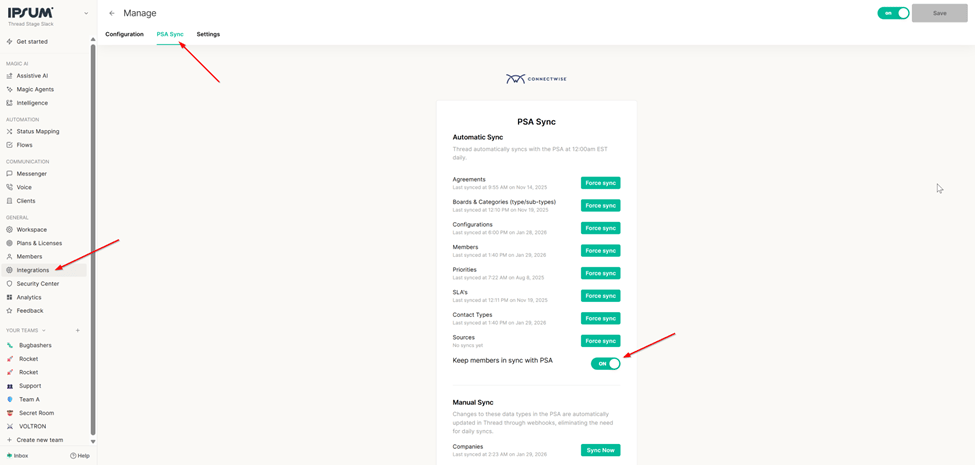
Member Syncing with PSA
Maintaining an accurate list of team members is essential for ensuring that service delivery and communication flow smoothly within Thread. The Keep Members in Sync with PSA toggle automates the management of your member list by mirroring the status of users in your Professional Services Automation (PSA) tool.The Value of PSA Syncing
Manually updating member lists as employees join or leave your organization is time-consuming and prone to human error. By enabling this sync, you ensure that:- Security stays tight: When a member is deactivated in your PSA, their status is automatically updated in Thread.
- Onboarding is seamless: New members added to your PSA are automatically recognized by Thread.
- Data integrity: You maintain a single source of truth for your team’s active status.
How It Works
The behavior of the member sync depends on whether the toggle is active. By default, this setting is ON.How to Manage Member Sync
You can find and adjust this setting within your Thread environment by following these steps:1
Navigate to the Admin Panel
Navigate to the Admin Panel.
2
Select Integrations
Select Integrations from the sidebar.
3
Click on PSA
Click on PSA.
4
Open the PSA Sync tab
Open the PSA Sync tab.
5
Locate the Keep Members in Sync with PSA toggle
Locate the Keep Members in Sync with PSA toggle to adjust your preference.