> ## Documentation Index
> Fetch the complete documentation index at: https://helpdocs.getthread.com/llms.txt
> Use this file to discover all available pages before exploring further.
# How to Manage Your Inbox Notifications
> Customize Thread Inbox notifications using channel preferences like All, Owner, Mentions, or Off, plus push alerts, unread badges, and per-thread mute controls.
## Overview
Notifications in Inbox keep you informed on the conversations you care about.
## **Notification types**
When you have an unread notification from a thread, you’ll receive visual and audio alerts helping draw your attention to that update.
| Push notification : Receive a push notification through your browser or desktop application, which displays details about the thread and navigates you into that thread view when clicked. | |
| ------------------------------------------------------------------------------------------------------------------------------------------------------------------------------------------------------------------------------------------------------------------------------------------ | - |
| Unread badge : Unread badges are displayed next to threads and channels with new activity. Opening up an unread thread marks the thread as 'read' and removes the unread badge. Channels display an unread badge if there is at least one thread with unread activity within that channel. | |
| Audio alert : An audio chime will be played while Inbox is opened when you receive an unread message or a new thread within a channel. You can customize these further from Preferences > General under the Sounds section. | |
### **Adjust notifications for a channel**
By default, all channels you are invited into or create are set to the “Owner” preference. With this setting, you’ll receive notifications if you are assigned to a thread, receive messages from contacts for assigned threads, and *@mentioned* by another teammate.
You'll receive push notifications, unread badges, and audio alerts when you receive a notification.
Hover over a channel under the Channels dropdown in Inbox and select the ellipsis icon (•••).
Under the **Notifications** section, select your notification preferences.
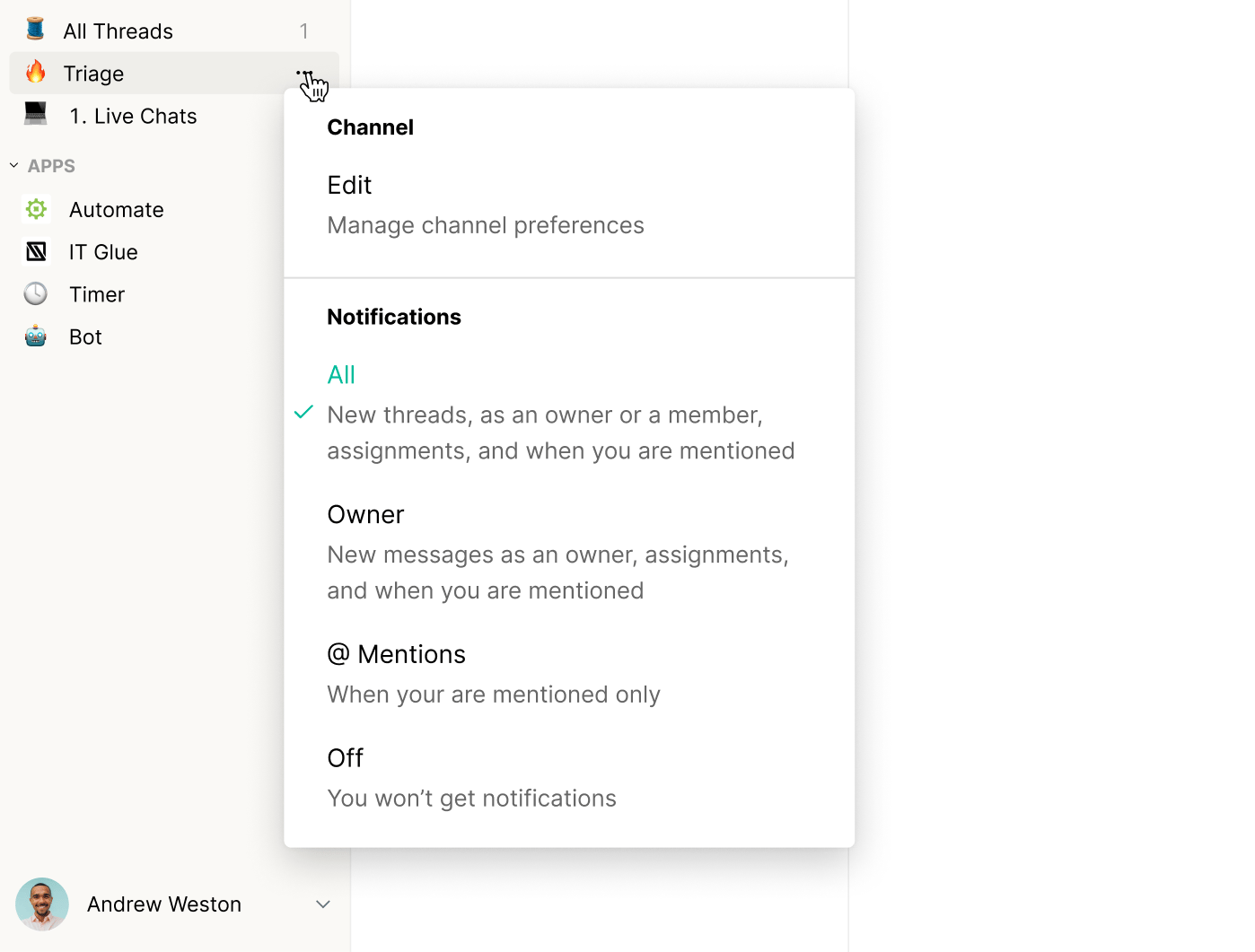 You can change your preference for individual channels at any time. Notification preferences are saved across all devices and will continue across future sessions.
### **Customize individual threads**
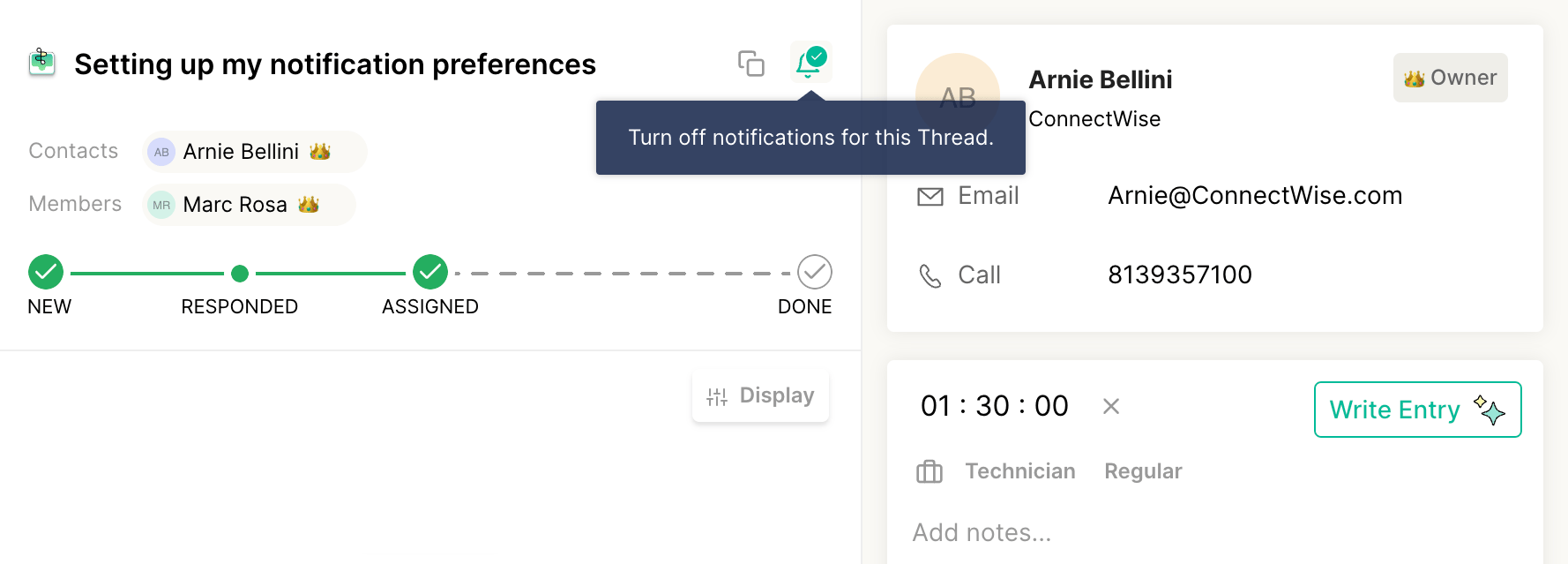
You can fine-tune your notification preferences further by enabling or disabling notifications for specific threads.
In Inbox, open up a thread.
In the top right corner of the main thread container, toggle the bell icon on or off depending on your preference.
You can change your preference for individual channels at any time. Notification preferences are saved across all devices and will continue across future sessions.
### **Customize individual threads**
You can fine-tune your notification preferences further by enabling or disabling notifications for specific threads.
In Inbox, open up a thread.
In the top right corner of the main thread container, toggle the bell icon on or off depending on your preference.
 ### **More about notification options**
You can choose from one of four notification options for each channel you’ve created or joined.
| Preference | Description | Ideal role |
| ---------- | ---------------------------------------------------------------------------------------------------------------------------------------- | ------------------------------------------------------------------------------------------------- |
| All | Receive notifications for new threads, if you've been assigned to a thread, receive new messages to assigned threads, and are mentioned. | Dispatchers and Service Managers who want to quickly review and respond to newly-created threads. |
| Owner | Receive notifications if you've been assigned to a thread, receive new messages to assigned threads, and are mentioned. | Technicians who focus on their assigned threads and collaborations with teammates. |
| Mentions | Receive notifications if mentioned within a thread. | Managers and teammates who provide support for technicians. |
| Off | Notifications are muted for all threads within that channel. | |
## Frequently Asked Questions
You will always receive a notification for a thread if at least one channel containing that thread has notifications set to All, Owner, or Mentions and if the update matches that preference.
No, you will not receive a notification for that thread since that thread doesn’t live within any of your Inbox channels. You will, however, have access to that thread through either the My Inbox or Mentions section.
## Related topics
- [Views and Insights in Thread Inbox](/inbox/views-and-insights.md)
- [How Notifications Work for your Team](/notifications/how-will-notifications-work-internally.md)
- [How Notifications Work for your Customers](/notifications/how-notifications-work-externally.md)
### **More about notification options**
You can choose from one of four notification options for each channel you’ve created or joined.
| Preference | Description | Ideal role |
| ---------- | ---------------------------------------------------------------------------------------------------------------------------------------- | ------------------------------------------------------------------------------------------------- |
| All | Receive notifications for new threads, if you've been assigned to a thread, receive new messages to assigned threads, and are mentioned. | Dispatchers and Service Managers who want to quickly review and respond to newly-created threads. |
| Owner | Receive notifications if you've been assigned to a thread, receive new messages to assigned threads, and are mentioned. | Technicians who focus on their assigned threads and collaborations with teammates. |
| Mentions | Receive notifications if mentioned within a thread. | Managers and teammates who provide support for technicians. |
| Off | Notifications are muted for all threads within that channel. | |
## Frequently Asked Questions
You will always receive a notification for a thread if at least one channel containing that thread has notifications set to All, Owner, or Mentions and if the update matches that preference.
No, you will not receive a notification for that thread since that thread doesn’t live within any of your Inbox channels. You will, however, have access to that thread through either the My Inbox or Mentions section.
## Related topics
- [Views and Insights in Thread Inbox](/inbox/views-and-insights.md)
- [How Notifications Work for your Team](/notifications/how-will-notifications-work-internally.md)
- [How Notifications Work for your Customers](/notifications/how-notifications-work-externally.md)