> ## Documentation Index
> Fetch the complete documentation index at: https://helpdocs.getthread.com/llms.txt
> Use this file to discover all available pages before exploring further.
# Configure Magic Sentiment
> Enable Magic Sentiment in Thread to score customer messages in real time, surface at-risk threads, and prioritize support coaching across chat and email.
## **What is Magic Sentiment?**
**Magic Sentiment** gives your team real-time insight into customer satisfaction—so you can step in early, resolve issues faster, recognize great experiences, and continuously improve service quality.
No need to chase down CSAT scores or manually review conversations.
### **How It Works**
Magic Sentiment runs quietly in the background, analyzing conversations as they happen:
* **Watches every thread** for customer replies
* **Analyzes the last 3 messages** from the end-user
* **Scores sentiment in real-time** and updates it on the thread
To ensure accurate scoring, sentiment analysis begins only after the customer has sent at least three messages. Early frustration is common in IT support, so the first message is excluded from the overall sentiment score.
### **The Scoring System**
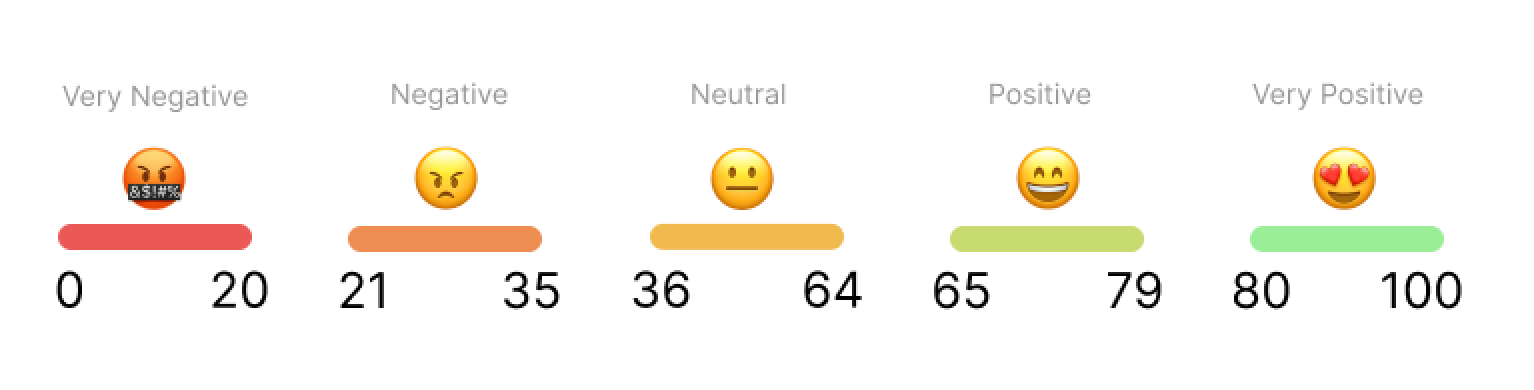 * Every thread starts with a **neutral score of 50**
* Each message can **raise or lower** that score based on sentiment
* The score ranges from **0 (very negative)** to **100 (very positive)**
This dynamic score gives your team a live view of how customers are feeling—so you can:
* Spot at-risk conversations quickly
* Prioritize issues that need extra attention
* Celebrate standout service moments
* Track sentiment trends across your support team
## **How to Configure Magic Sentiment**
You can enable and customize Magic Sentiment in just a few clicks.
Go to the [**Thread admin panel**](https://admin.getthread.com)
Navigate to **Magic AI** → **Sentiment**.
**Choose where to apply sentiment:**
* **All customers** (Recommended) – Applies sentiment analysis to every thread
* **Specific clients** – Apply sentiment only to selected customers *This setting is not customer-facing, so we recommend enabling it for **all clients**.*
**Select the type of support channels:**
* **Use for chat and email** *(Recommended)*
* **Use only for chat**
* **Use only for email**
**Enable Sentiment:** In the top-right corner, click the **toggle to ON**
Magic Sentiment is now active! Sentiment scoring will begin automatically on all new customer replies and threads.
## **Next Up — Configure Automatic Escalations and Recap Templates for Sentiment Analysis**
Now that Sentiment is live, it’s time to make it actionable. Set up **automatic escalations and recap templates** to instantly flag moments of poor or excellent sentiment—so your team can step in early to resolve issues, or recognize wins while they’re still happening.
These workflows helps you:
* **Escalate at the right moment** when a customer message feels tense or urgent
* **Celebrate positive interactions** and reinforce great service
* **Summarize sentiment trends** with recaps your team can act on
Keep conversations on track, reduce response lag, and bring more visibility to what matters—without adding manual effort.
Click Here to Get Started!
## Related topics
- [Configure Magic Auto Prioritization](/assistive-ai/how-to-set-up-auto-prioritization.md)
- [Configure Magic Title in Thread](/assistive-ai/setting-up-magic-title.md)
- [Sentiment Flows, Escalations, and Recap Templates](/assistive-ai/configure-automatic-escalations-and-recap-templates-for-sentiment-analysis.md)
* Every thread starts with a **neutral score of 50**
* Each message can **raise or lower** that score based on sentiment
* The score ranges from **0 (very negative)** to **100 (very positive)**
This dynamic score gives your team a live view of how customers are feeling—so you can:
* Spot at-risk conversations quickly
* Prioritize issues that need extra attention
* Celebrate standout service moments
* Track sentiment trends across your support team
## **How to Configure Magic Sentiment**
You can enable and customize Magic Sentiment in just a few clicks.
Go to the [**Thread admin panel**](https://admin.getthread.com)
Navigate to **Magic AI** → **Sentiment**.
**Choose where to apply sentiment:**
* **All customers** (Recommended) – Applies sentiment analysis to every thread
* **Specific clients** – Apply sentiment only to selected customers *This setting is not customer-facing, so we recommend enabling it for **all clients**.*
**Select the type of support channels:**
* **Use for chat and email** *(Recommended)*
* **Use only for chat**
* **Use only for email**
**Enable Sentiment:** In the top-right corner, click the **toggle to ON**
Magic Sentiment is now active! Sentiment scoring will begin automatically on all new customer replies and threads.
## **Next Up — Configure Automatic Escalations and Recap Templates for Sentiment Analysis**
Now that Sentiment is live, it’s time to make it actionable. Set up **automatic escalations and recap templates** to instantly flag moments of poor or excellent sentiment—so your team can step in early to resolve issues, or recognize wins while they’re still happening.
These workflows helps you:
* **Escalate at the right moment** when a customer message feels tense or urgent
* **Celebrate positive interactions** and reinforce great service
* **Summarize sentiment trends** with recaps your team can act on
Keep conversations on track, reduce response lag, and bring more visibility to what matters—without adding manual effort.
Click Here to Get Started!
## Related topics
- [Configure Magic Auto Prioritization](/assistive-ai/how-to-set-up-auto-prioritization.md)
- [Configure Magic Title in Thread](/assistive-ai/setting-up-magic-title.md)
- [Sentiment Flows, Escalations, and Recap Templates](/assistive-ai/configure-automatic-escalations-and-recap-templates-for-sentiment-analysis.md)